Making a deposit is simple. Follow these simple steps to know how:
- Click on the "Deposit"’button on the top right corner of the screen.

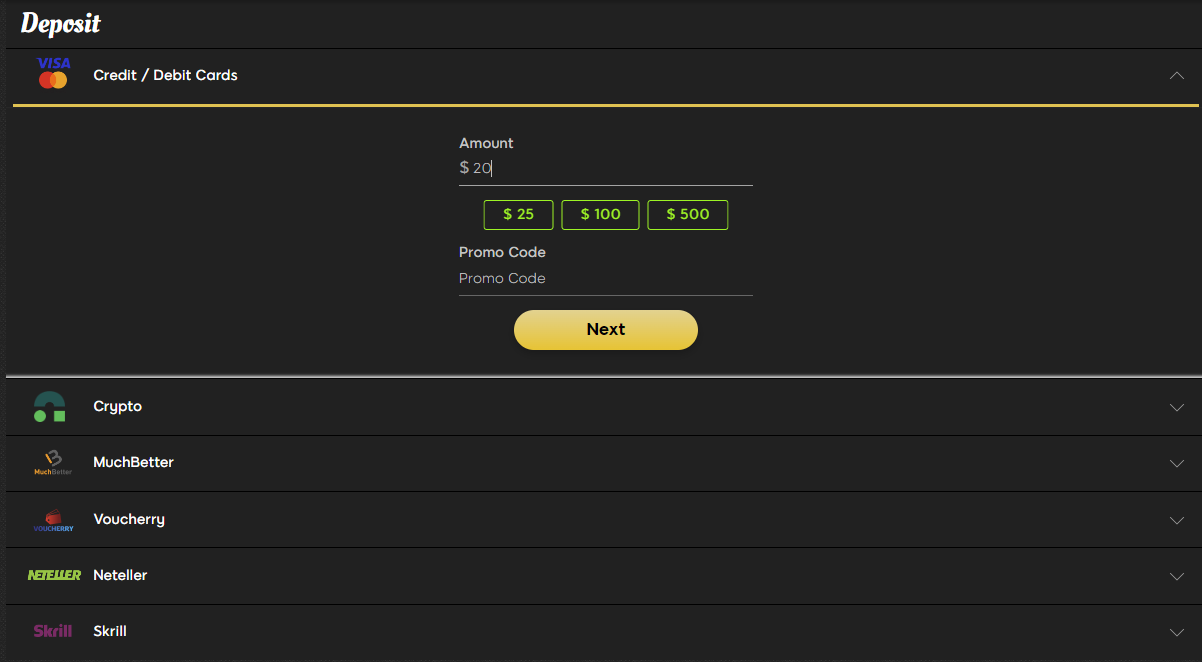
- Click on the payment method of your choice and enter the amount you wish to deposit and click on "Next".
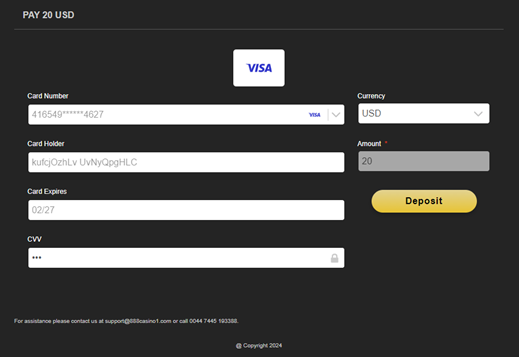
- Enter your card details and click "Deposit".
After clicking "Deposit" you will receive a pop-up either confirming or declining your deposit.
00:01: To deposit money in your account with credit or debit card first, click on the deposit
00:06: button. Select
00:13: credit debit card. Input
00:20: the amount you want to deposit, then select next.
00:29: Enter your card details. Then select deposit.
00:40: If your transaction has been approved, you can go back to the site.
00:48: A pop-up with your transaction reference will appear select.
00:51: Okay and start playing your favorite games.
00:57: And,
00:04: To deposit money in your account first tap on your profile icon.
00:13: Tap deposit. Tap
00:21: on your preferred payment method. Input
00:29: the amount you want to deposit then tap on next.
00:41: Enter your details and tap on deposit.